
Ask an AI about this page
 ChatGPT
 Claude
 Perplexity
 Google AI Mode
 Microsoft Copilot
 Grok
 Mistral Le Chat
Pause & resume a campaign
You can pause a campaign that sends or is scheduled, for example if you find an error in the email. When you resume the campaign, Mail Niaga sends the email only to the subscribers who did not get it yet. A campaign can also stop automatically when the sending credits are finished.
Pause a campaign
Section titled “Pause a campaign”Pause is available for a campaign with the status Queued, Sending or Scheduled. Pause is also available for an A/B test that waits for the winning variant or sends the winning variant.
- Click Campaigns → Email.
- Open the menu on the row of the campaign.
- Click Pause.
- Click Pause in the “Pause this campaign?” confirmation box.
The Mail Niaga console shows the message “One or more campaigns were successfully paused”. The status of the campaign changes to Paused.
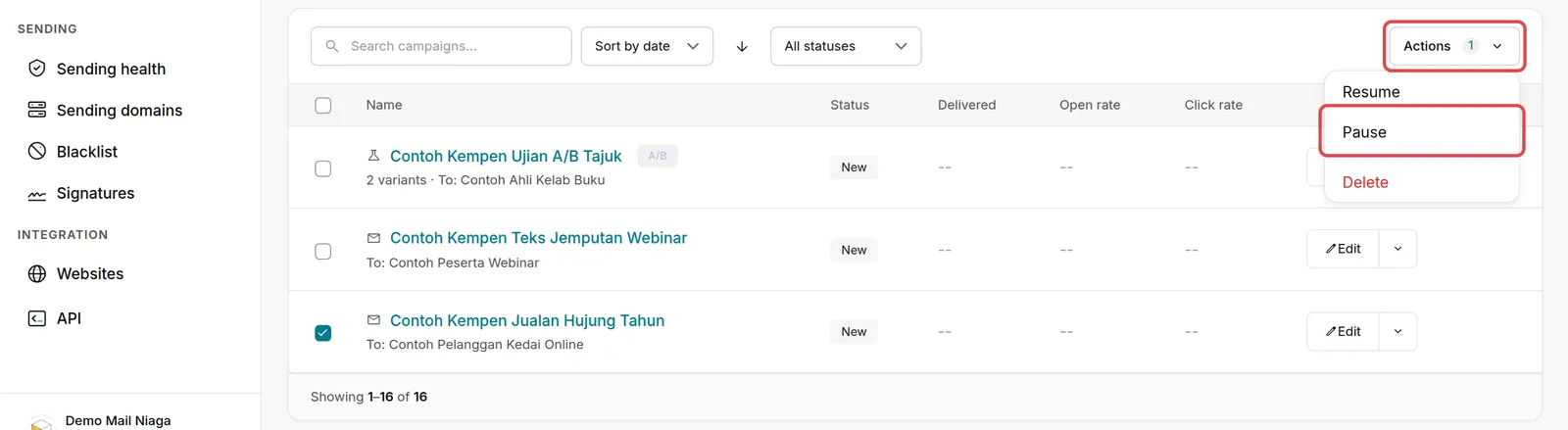
To pause many campaigns at the same time, tick the check box on the row of each campaign. The Actions button shows with the number of ticked campaigns. Then click Actions → Pause, and click Pause in the “Pause selected campaigns?” confirmation box. The console pauses only the campaigns that it can pause.
Resume a campaign
Section titled “Resume a campaign”Resume is available for a campaign with the status Paused or Error.
- Click Campaigns → Email.
- Open the menu on the row of the campaign.
- Click Resume.
- Click Resume in the “Resume this campaign?” confirmation box.
The console shows the message “One or more campaigns were successfully restarted”. For many campaigns at the same time, tick the check box on the row of each campaign, and click Actions → Resume. Then confirm “Resume selected campaigns?”.
A campaign that stopped because it had no credits
Section titled “A campaign that stopped because it had no credits”A campaign stops automatically when there are no sending credits to use. This is not an error. Mail Niaga keeps the subscribers who did not get the email yet. The status of the campaign in the list shows the cause. The campaign summary page shows a banner with a button to correct the problem:
| Banner | Cause | Button |
|---|---|---|
| Paused: out of sending credits | The plan credits and the credits that you bought are finished. | Buy credits |
| Paused: the plan has no sending credits | The current plan does not include sending credits. | Change plan |
| Paused: no active plan | Your account has no active plan. | Choose a plan |
To resume that campaign, do these steps:
- Click the button on the banner, for example Buy credits, and complete the purchase. See Buy credits and pay with Bayarcash.
- Open the campaign summary page again.
- Click Resume on the banner.
- Click Resume in the “Resume sending this campaign?” confirmation box.
If the credits are still not enough, the console does not resume the campaign. The console shows the message “Not resumed: … still has no sending credits to use. Buy credits first.”
This advice helps you to get better results:
- Pause the campaign immediately when you find an error. You cannot get back the emails that are sent. But a pause stops the email to the other subscribers.
- Check your credit balance before you send a large campaign. The Confirm step gives a warning if the credits are not enough to complete the campaign.
- Know the difference between Paused and Outside sending hours. A campaign outside its sending hours continues automatically when the sending hours start again, without Resume.
Common issues
Why do I not see Pause on my campaign?
Pause is available only for a campaign with the status Queued, a campaign that sends or a scheduled campaign. You cannot pause a draft campaign or a campaign that is fully sent.
What do I do if my campaign stopped automatically with the status Paused: out of credits?
You have no more sending credits. Buy credits, then open the campaign and click Resume. Mail Niaga keeps the subscribers who did not get the email yet, and Resume sends the email to them.
Why can I not resume an archived campaign?
When you archive a campaign, its sending logs are removed. Without those logs, Mail Niaga does not know who got the email. Thus, you cannot send that campaign again.
Was this article helpful?
Thanks for your feedback.
Sorry, this page did not help. Chat on Messenger and we will help you fix it.