Ask an AI about this page
 ChatGPT
 Claude
 Perplexity
 Google AI Mode
 Microsoft Copilot
 Grok
 Mistral Le Chat
Change your password
You can change the password of your Mail Niaga console at any time on the Profile page. You must log in first. If you forgot your password and cannot log in, click Forgot password? on the login page. See Forgot your password.
Change your password
Section titled “Change your password”Do these steps after you log in.
-
Click your name at the bottom of the sidebar, then click Account.
-
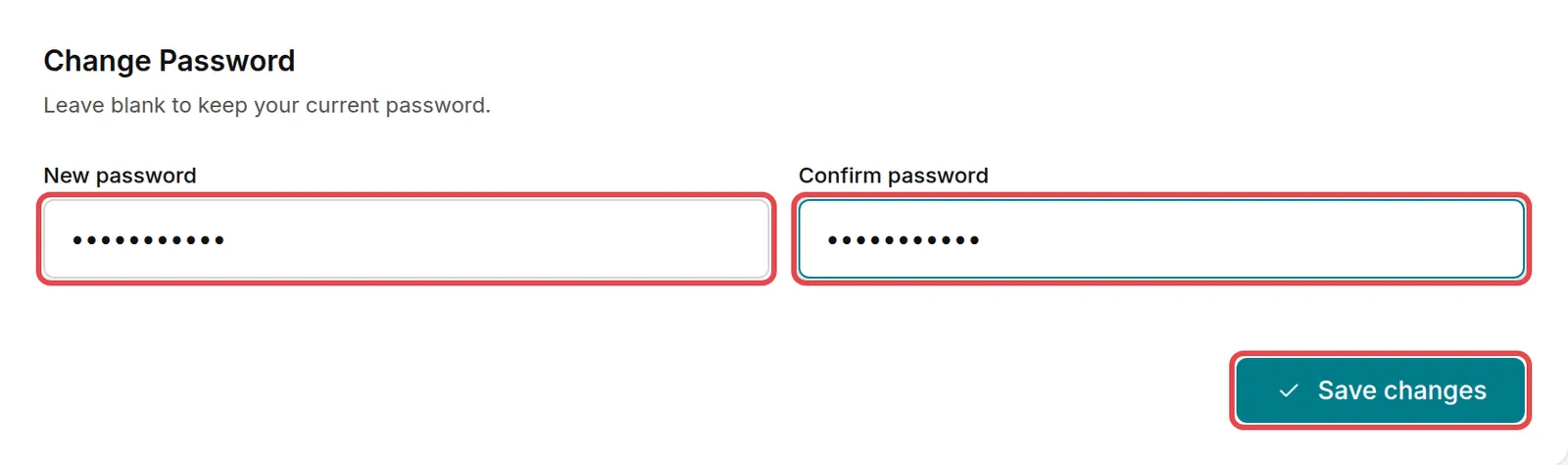
Scroll down to the Change Password section.
-
Type the new password in New password.
-
Type the same password again in Confirm password.
-
Click Save changes.
Use this new password the next time you log in.
If you keep New password empty, the old password stays. You can update your name and phone number on the same page and not change the password.
This advice helps you keep your account safe:
- Use a long and unique password for Mail Niaga. Do not use the same password for your email or social media accounts.
- Keep your password in a password manager. You do not have to remember or type the password by hand. Then you make fewer errors when you type the password.
- Turn on two-factor authentication. With 2FA, a leaked password is not sufficient to get into your account. See Turn on two-factor authentication (2FA).
Common issues
What do I do if I typed the new password incorrectly and now I cannot log in?
On the login page, click Forgot password?. Type the email address of your account and click Send reset link. Open the link in that email to set a new password.
Must I fill in Change Password each time I click Save changes?
No. Keep New password and Confirm password empty to keep your current password. The console shows Leave blank to keep your current password.
How do I change the password of a different team member?
A user who can open Users (for example, with the Full Access role) can click the name of that team member. Then fill in Password and Confirm password. See Add team members and set roles.
Was this article helpful?
Thanks for your feedback.
Sorry, this page did not help. Chat on Messenger and we will help you fix it.