Ask an AI about this page
 ChatGPT
 Claude
 Perplexity
 Google AI Mode
 Microsoft Copilot
 Grok
 Mistral Le Chat
Campaign webhooks: get open, click & unsubscribe notifications
A campaign webhook sends a notification to your server for each open, click or unsubscribe in that campaign. Your server, or a tool such as Pabbly Connect, Make or Zapier, can then act immediately. For example, the tool can update a CRM or tag the subscriber. The sections about the signature check are for developers.
You set the webhooks on each campaign. There is no webhook setting for the full account.
Add a webhook to a campaign
Section titled “Add a webhook to a campaign”You need a URL that can receive POST requests, for example https://example.com/webhooks/mail-niaga or a Catch Webhook URL from Pabbly Connect.
-
In the sidebar, click Email, then open the campaign.
-
Go to the Setup step.
-
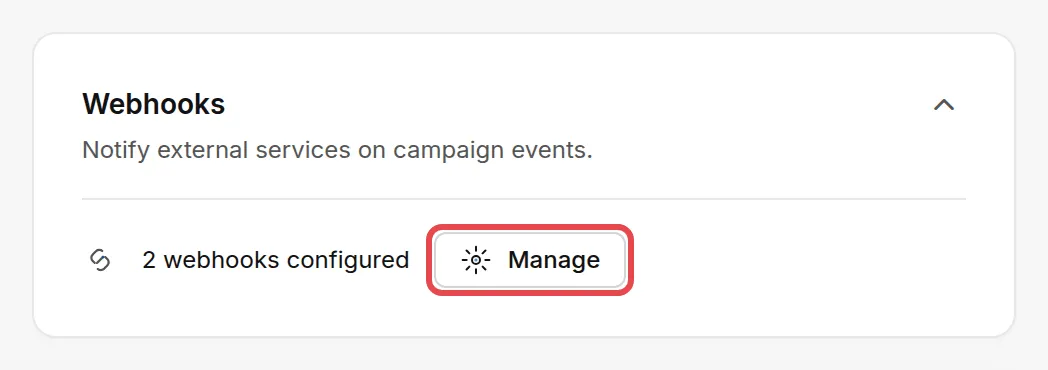
Click the Webhooks card (“Notify external services on campaign events.”) to open it, then click Manage.
-
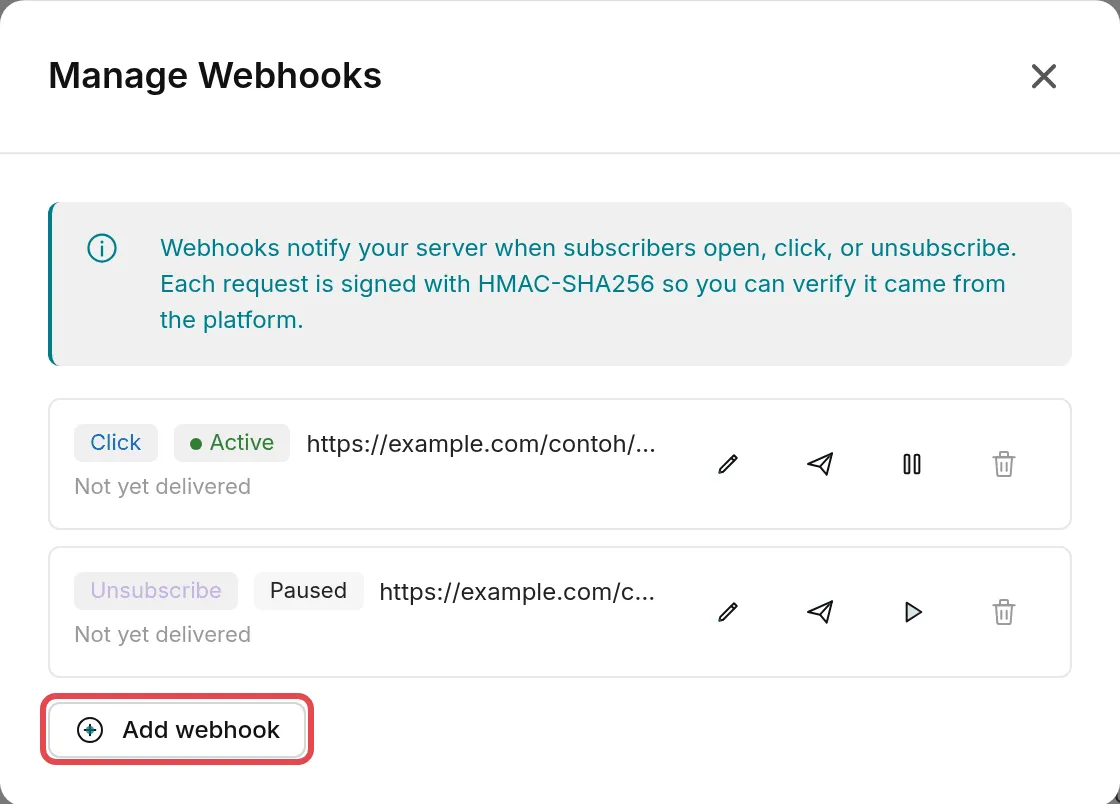
The Manage Webhooks popup opens. This popup lists the webhooks that you have now. Click Add webhook.
-
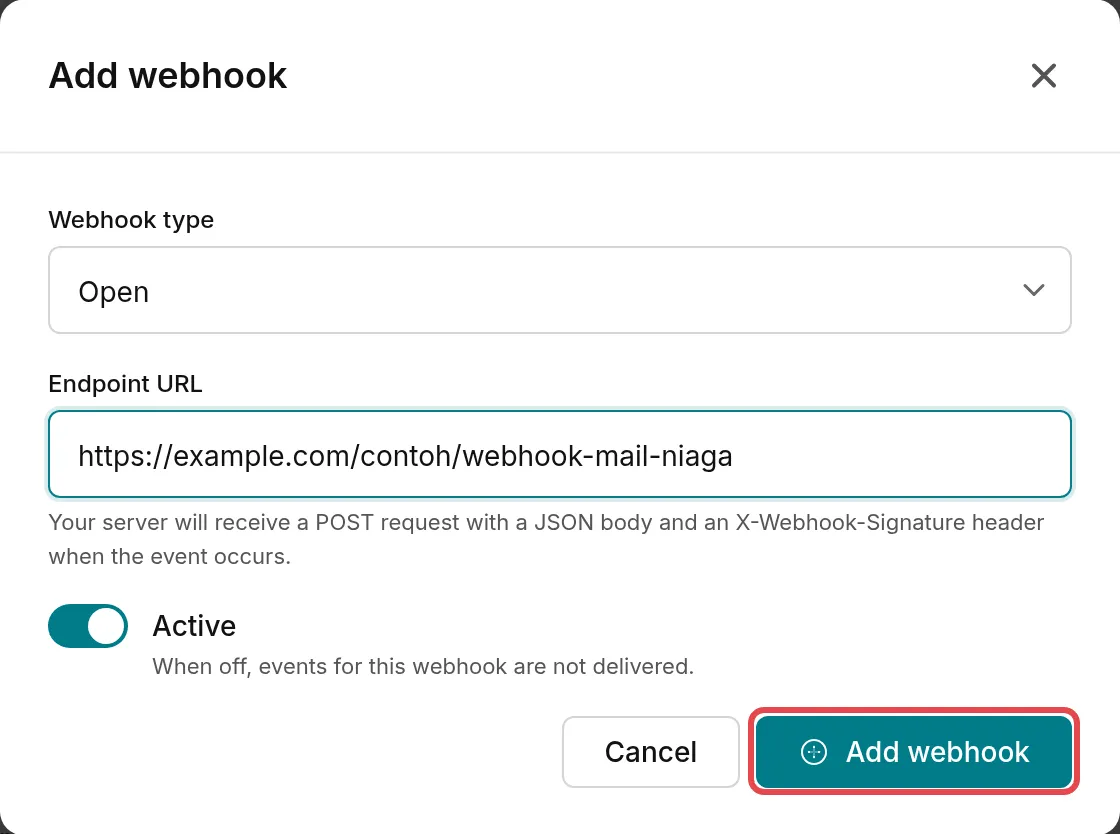
In Webhook type, choose the event: Open, Click or Unsubscribe.
-
In Endpoint URL, paste the URL of your server.
-
Keep the Active switch on. When this switch is off, Mail Niaga does not send the events for this webhook.
-
Click Add webhook.
The new webhook shows in the Manage Webhooks list, with the event type, the status and the Endpoint URL. Before the first event, the webhook shows Not yet delivered. Do steps 4 to 8 again for the other event types.
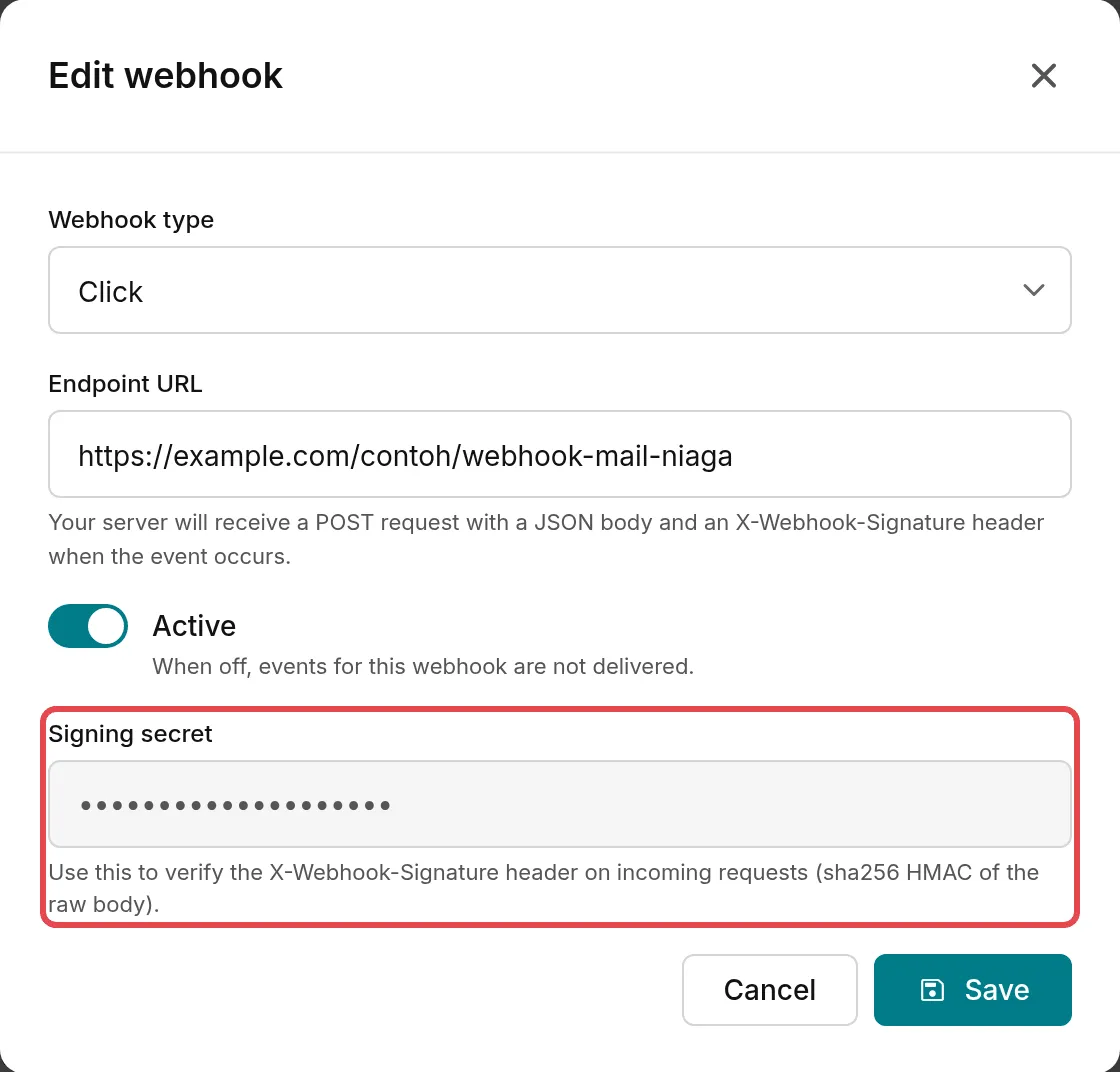
To check the signature, you need the Signing secret. Click the Edit icon on the webhook. The Edit webhook popup shows the secret.
Manage webhooks
Section titled “Manage webhooks”Each webhook in the Manage Webhooks list has icon buttons. Put the pointer on an icon to see its name.
| Button | What it does |
|---|---|
| Send a test | Sends a sample payload to your endpoint now. The console shows Test delivered when the test is successful, Test rejected by endpoint when the endpoint refuses it, or Endpoint unreachable when the console cannot connect to your server. The test stops after 10 seconds. |
| Edit | Opens the Edit webhook popup. Change the Webhook type, the Endpoint URL or the Active switch, then click Save. This popup also shows the Signing secret. |
| Pause and Resume | Stops the webhook deliveries for a time, and starts them again. |
| Delete | Deletes the webhook. The console asks Delete this webhook? first. |
The status of each webhook also shows in this list:
| Status | What it means |
|---|---|
| Active | Mail Niaga sends the events to your endpoint. |
| Paused | You stopped this webhook. Click Resume to start it again. |
| Auto-disabled | Mail Niaga stopped the webhook after 20 failed attempts in sequence. Fix the endpoint, then click Resume. |
What your server receives
Section titled “What your server receives”This section is for developers. Mail Niaga sends a POST request with a JSON body to the Endpoint URL.
This table shows the request headers:
| Header | Content |
|---|---|
X-Webhook-Event |
The event type: open, click or unsubscribe. |
X-Webhook-Id |
The uid of the webhook. |
X-Webhook-Delivery |
The ID of this delivery. It is the same for each retry. |
X-Webhook-Signature |
sha256= and then the HMAC SHA-256 of the raw body, with the Signing secret as the key. |
X-Webhook-Test |
1 when the request comes from Send a test. |
A sample body for a click event (sample data):
{ "version": "1", "event": "click", "webhook_uid": "wh_sample_uid", "delivery_uid": "3f1c2a9e-0000-4000-8000-000000000000", "occurred_at": "2026-11-26T10:15:00+08:00", "campaign": { "uid": "sample-campaign-uid", "name": "Promosi Hujung Tahun" }, "subscriber": { "uid": "sample-subscriber-uid", "email": "aisyah.rahman@example.my" }, "event_data": { "url": "https://example.com/promosi", "ip": "192.0.2.10", "user_agent": "Mozilla/5.0" }}For Open and Unsubscribe, event_data has only ip and user_agent.
Your endpoint must reply with a 2xx status. Mail Niaga tries again when it cannot connect to your server. It also tries again after a 408, 429 or 5xx reply. There are a maximum of 5 attempts, with 1 minute, 5 minutes, 15 minutes and 1 hour between them. Mail Niaga records each other 4xx status as a rejection and does not try again.
Check the signature
Section titled “Check the signature”Check X-Webhook-Signature to make sure that the request comes from Mail Niaga. Copy the Signing secret from the Edit webhook popup. Then calculate the HMAC SHA-256 of the raw body, before you change the body to JSON.
An example in Node.js:
import crypto from 'node:crypto';
// rawBody: body permintaan sebagai string, sebelum JSON.parsefunction sahTandatangan(rawBody, header, signingSecret) {  const expected = 'sha256=' + crypto.createHmac('sha256', signingSecret).update(rawBody).digest('hex');  return header.length === expected.length && crypto.timingSafeEqual(Buffer.from(header), Buffer.from(expected));}
An example in PHP:
$raw = file_get_contents('php://input');$expected = 'sha256=' . hash_hmac('sha256', $raw, $signingSecret);if (!hash_equals($expected, $_SERVER['HTTP_X_WEBHOOK_SIGNATURE'] ?? '')) { http_response_code(401); exit;}See the webhook delivery log
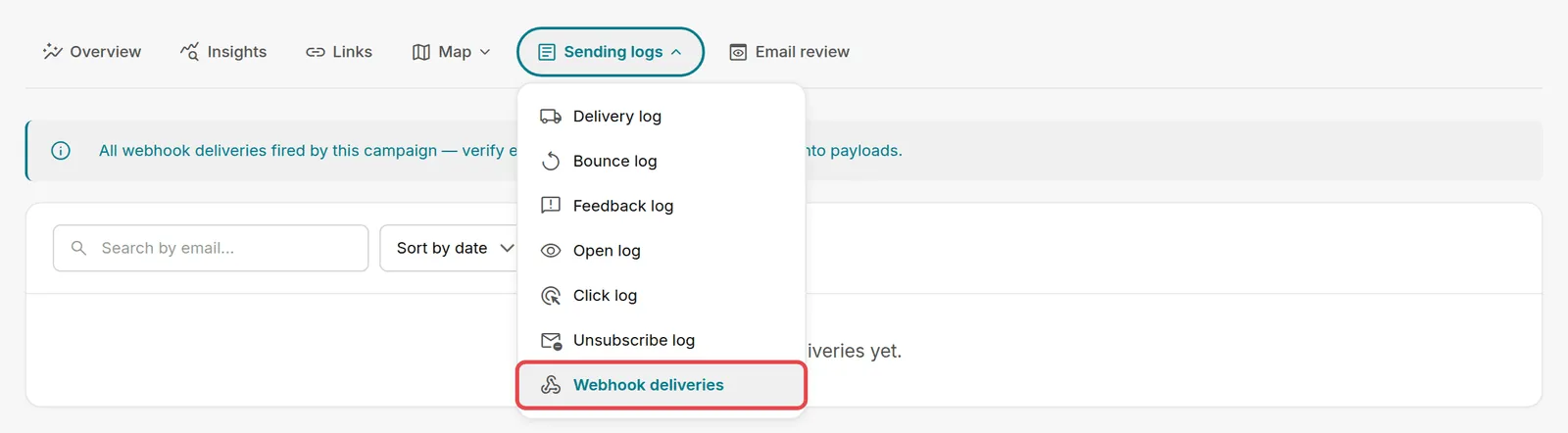
Section titled “See the webhook delivery log”This log shows each webhook delivery from one campaign. Use this log to make sure that your endpoint receives the events.
-
In the sidebar, click Email, then click the name of a sent campaign.
-
Click Sending logs → Webhook deliveries.
-
Search with the Search by email… box, or change the order with Sort by date.
-
Click the badge in the Status column to open the Webhook delivery popup. The popup shows Event, Status, Attempts, Request body, Response body and Error.
When there are no events, this page shows No webhook deliveries yet.
This table tells you what each delivery status means:
| Delivery status | What it means |
|---|---|
| Success | Your endpoint replied with a 2xx status. |
| Pending | Not successful yet. Mail Niaga will try again. |
| Rejected by endpoint | Your endpoint replied with a 4xx status. Mail Niaga does not try again. |
| Permanently failed | All the retries failed. |
This advice helps you receive the webhooks reliably:
- Click Send a test before you send the campaign. Then you know that your endpoint works before the real events come.
- Reply first, and do the slow work later. Save the payload and reply 200 first. Then a delivery does not fail because of a timeout.
- Use
delivery_uidto prevent duplicate data. A retry uses the same ID. Ignore an ID that you processed before.
Common issues
What do I do when my webhook changes to Auto-disabled?
Mail Niaga stops a webhook after 20 failed delivery attempts in sequence. Fix your endpoint first. Then click the Resume icon on the webhook. To see why the deliveries failed, go to Sending logs → Webhook deliveries.
Do I need three webhooks to get opens, clicks and unsubscribes?
Yes. Each webhook has only one Webhook type. Add one webhook for each type. The Endpoint URL can be the same for all three, because the X-Webhook-Event header tells the event type.
Can I use these webhooks with Pabbly Connect, Make or Zapier?
Yes. Create a webhook trigger in the tool (for example Catch Webhook). Copy the URL that the tool gives, and paste it in Endpoint URL.
Was this article helpful?
Thanks for your feedback.
Sorry, this page did not help. Chat on Messenger and we will help you fix it.